
Saturday, June 25, 2011


Tuesday, March 29, 2011
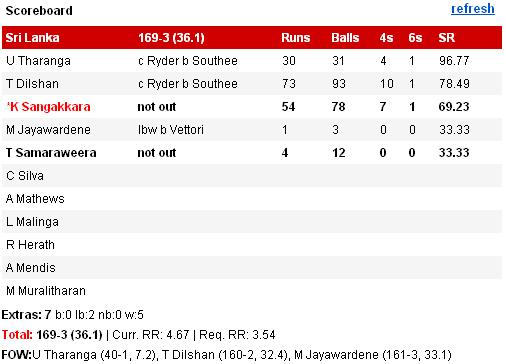
Cricket Scorecard
I loved the scorecard from yahoo which shows the way how player is out in a video window which was much needed in plain score tables since many years.
http://cricket.yahoo.com

http://www.cricbuzz.com

http://www.cricketcountry.com

http://www.espncricinfo.com

http://in.msn.com

http://scores.sify.com

http://www.rediff.com
http://www.cricketnirvana.com

Sunday, February 27, 2011
Hay Facebook, Stop my video buffering.. I don't want to watch it anymore!
As a part of social network, I use facebook almost daily for about 5-10 minutes and sometimes I do watch the videos posted by my friends :). Daily there are hundreds of videos posted/shared on facebook. While watching the video sometimes I discontinue watching one video and move on to other. But how do I stop playing the previous video? When I pause it, it stops playing but keeps on buffering causing the problem for my second video buffering. How do I stop buffering that video?
I searched for this on net and got the below link where you can stop the download for videos on youtube. But the "Stop download" option is hidden in the background and is available on right click.

This feature is more relevant on facebook as it shows more than one video at a time.
Monday, February 21, 2011
SYNC my browser at different locations
While reading online either at office or at home, I came across one problem.
I have few tabs opened in my browser at office and I want to continue my reading at home without using any online bookmarking tool. I don’t want to open up the bookmark application, sign in, click on the URL and then continue reading the page. What if I have multiple tabs in a browser and want to access all those from a different location? How can I have a single shared interface which will give me a seamless user experience regardless of different locations? Will a online browser or a browser plug-in will solve my problem?
I discussed this problem with my colleagues and got to know about Firefox’s sync plug-in which does exactly what I wanted:)
http://mozillalabs.com/sync/what-are-the-main-features-of-weave/
http://www.google.com/tools/firefox/browsersync/faq.html
Wednesday, February 9, 2011


HFI Certification
I was waiting for a courier since last one month which I received it yesterday. I received my HFI certificate and stamp. I reached at home late evening. There were two couriers from HFI, one from Bangalore and one from Mumbai. I guessed one is a certificate and the other one is stamp.
I opened the certificate and it was a nicely laminated, shiny, thick certificate wrapped in two envelopes. I felt good reading my name on it.
I was more interested in the other package. I opened the box and found a stamp inside. I was impressed with the first sight of it. I checked the stamp from all the sides and felt the smooth surface of it. I took out some of the papers and stamped my name on it. I looked at the paper and my name on it.
After some time, suddenly a thought came in to my mind that this stamp is of no use for me. Where and when I am going to use it? What was the point sending this stamp to a person who works in the digital world and has hardly done any paper work since last so many years? How many of CUA’s have used it and how many times?

My expectations were something different. They would have provided a something like below image with name and certification name on it, which would have a hair band pin on the other side which we would have carried in the office wearing it on our shirts. We would have carried it to all Usability Conferences.
More thought should have gone through this gift.
What do you think?Sunday, January 16, 2011
Linked in-Sign in Problem
Why do I need to click Sign in button twice to be into Linked in?
I was expecting this to be corrected long back but seem that Linked in people didn't observe this problem or is it something I have misunderstood the flow?

As I have saved the email and password, once clicked the Sign in link, it needs to navigate me to my page, but instead it shows another page to sign in as shown.

Thursday, January 6, 2011
iMindMap...tool to plan, study, create, present and organise your things...an Overview
- Very Easy to start your plan and notes in iMindMap
- Easy to remember and learn
- Easy to use the menus and icons at the top
- Various Export options
- Nice and large icons
- Options to view the map with different options
- Colored branches
- Text size varies depending upon the level of branching. For higher level..large font size
- You can plan your project
- Shortcuts
- Satisfied with the output

Where I stumbled upon...
- When full screen view is activated, I couldn't go back to normal view. I had to look for online help to get the normal view. The answer is toggle Ctrl+F11
- When fullscreen view, only icons are displayed which are difficult to remember which action does it perform
- Need to wait on each icon to appear the tooltip, which sometimes takes considerable time to appear
Monday, January 3, 2011
Saving 2 emil IDs in Hotmail
I sent a reply to my friend through Hotmail to his two different IDs. One is official and another personal. A screen appeared to save the email IDs with smart text boxes where IDs were already present and few empty boxes where I suppose to enter the name of my friend.
Just to check what error does Hotmail gives, I entered same name for both the addresses to save in my list. And to my great surprise it gave me an option to combine the email IDs. Also it moved the personal ID under Personal email Address heading and another under Official email Address header. That was done very intelligently. It made me happy :)
Saturday, January 1, 2011
Problem with Windows Media Player 9.0
I have two media players on my machine, Windows media player (Default) and Media Player Classic. Usually I watch the movies on Media Classic Player.

Once I wanted to watch a movie. I double clicked and it opened in windows player which I didn't noticed. I was watching it in full screen mode. I continued till I paused it to note down some instructions. There my frustration started.
To pause the movie in Windows Media Player I pressed "Space bar" for about 2-3 times but couldn't succeed so I used mouse where I needed to do it at the bottom bar. I did not want to exit from full screen mode. It happened 3-4 times.
I quit the windows media player and started watching the movie into my favorite Classic player where I could toggle the pause/play at one "Space bar" press.
Media Player Classic gives me a lot of flexibility and is much more compact.
Subscribe to:
Posts (Atom)